
Know Exactly Which Campaign Drives Every Call With DNI
CallGauge AI automatically replaces phone numbers on your website with dynamic tracking numbers and connects every inbound call back to its relevant source, campaign and visitor session. Understand which marketing campaigns generate your inbound calls, capture accurate call data and measure performance with visitor-level call tracking and attribution.
No credit card required · Setup in minutes
Accurate Attribution
See which traffic sources and campaigns drive inbound calls
Session Tracking
Maintain consistent number swapping across visitor sessions
Controlled Rotation
Manage number pools with fallback rules and routing control
Live Script Status
Monitor active tracking across your landing pages
Control How Numbers Are Assigned and Routed
Set up and manage your number pools that dynamically assign call tracking numbers to your visitors and route your inbound calls based on your configuration.
Visitor Sessions
Attribution That Reflects Actual Visitor Behavior
Understand how each visitor arrives on your website and connect their session directly to the resulting business call. Call attribution is assigned at the moment of interaction when Dynamic Number Insertion is activated, helping you track visitor-level call data with accurate campaign attribution.
- Track source and medium across Google Ads, paid, organic, direct and referral traffic
- Campaign level call mapping connected to real visitor sessions
- Session based attribution that links user journeys to inbound call activity
- Support multiple call attribution methods based on your configuration
- Structured data capture for consistent and reliable reporting
Pool Monitoring
Monitor Number Pools and Tracking Health
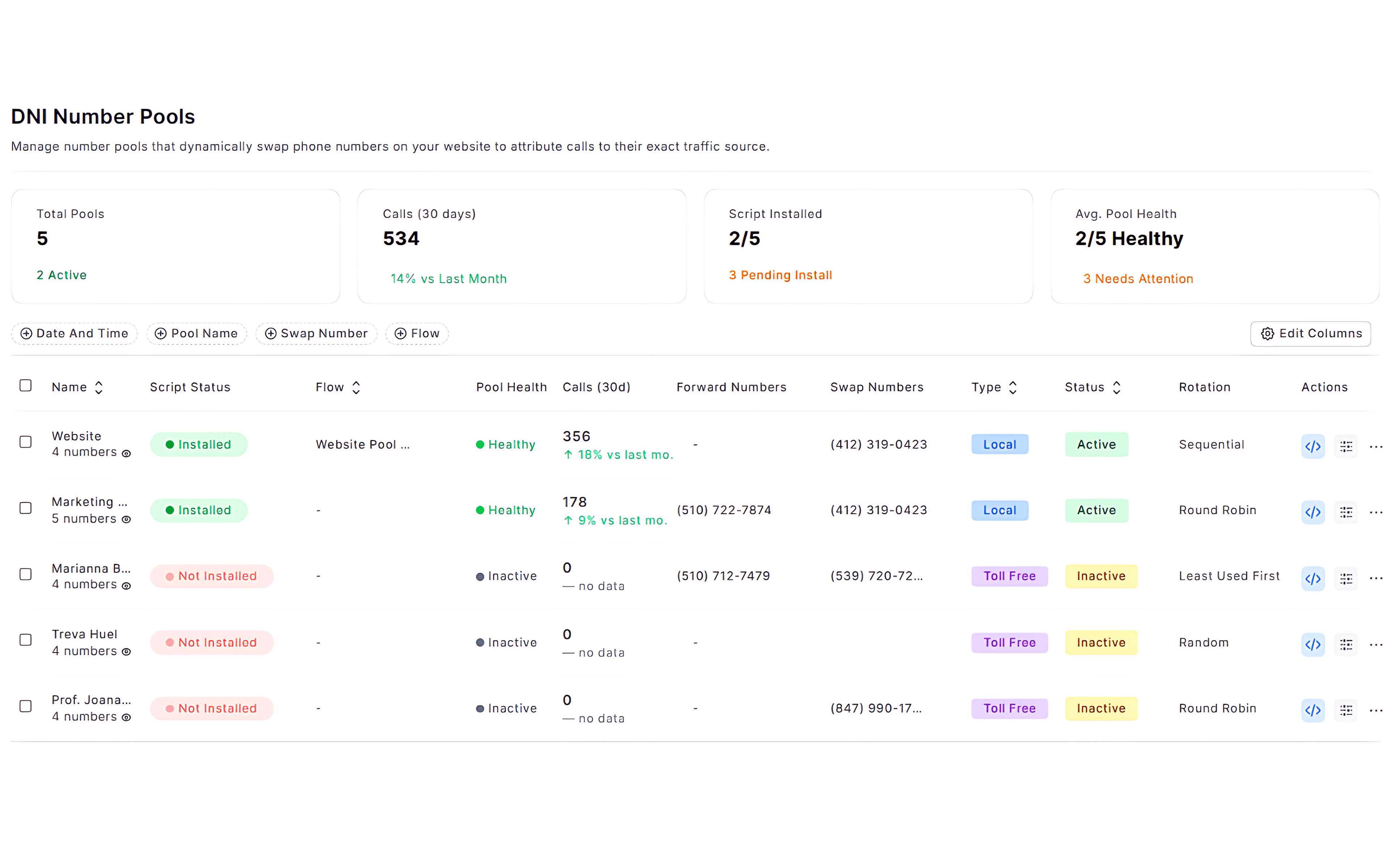
With CallGauge AI, monitor how your number pools are performing and confirm whether your tracking setup is functioning correctly or not. Review your pool activity, identify your issues early and maintain consistent call tracking behavior across your configuration.
Pool Health Status
Identify your active, inactive or under-utilized number pools.
Call Activity Tracking
Review your recent inbound call activity linked to each tracking number pool.
Script and Tracking Status
Confirm whether number swapping and call tracking are active on your website or not.
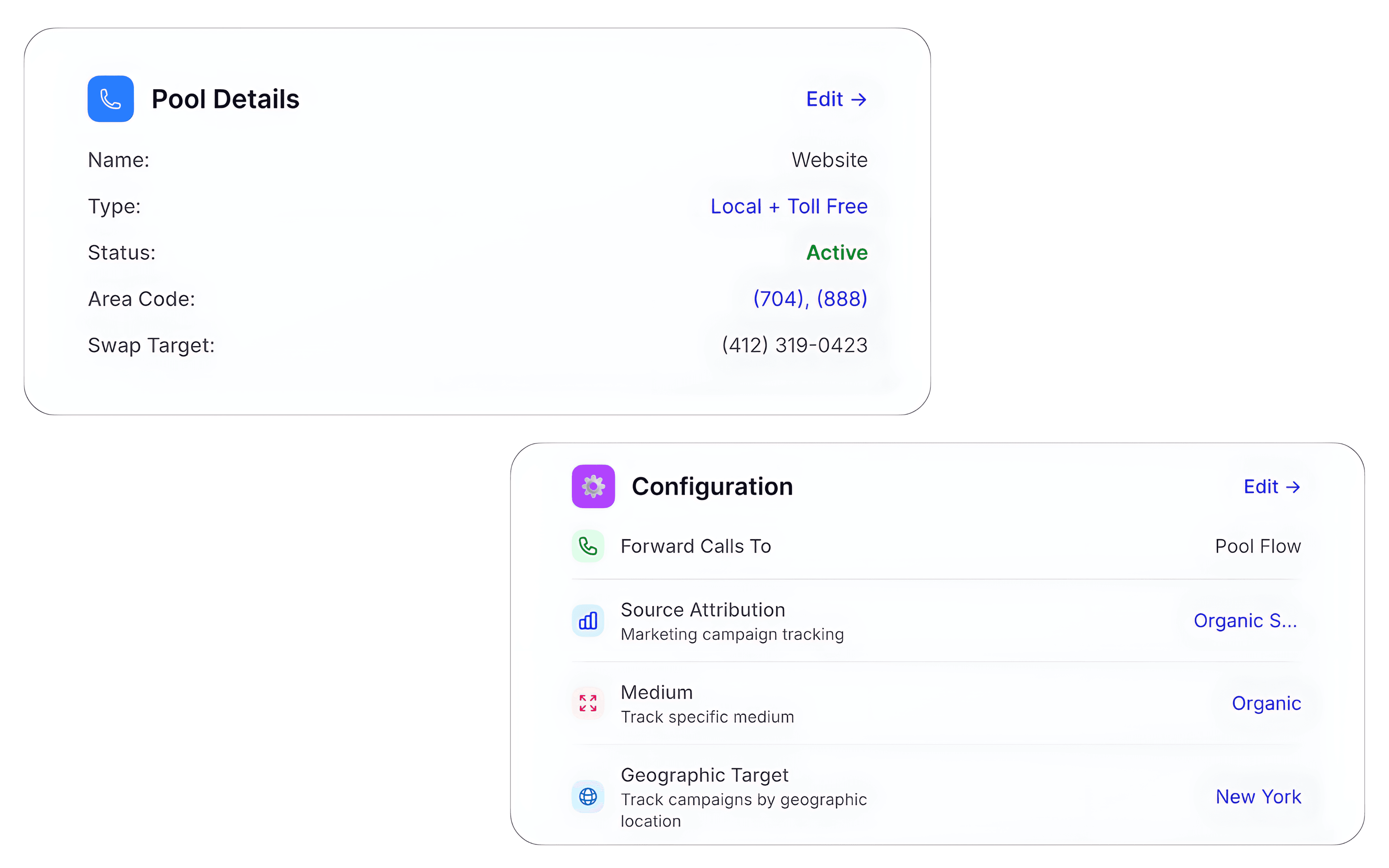
Configuration Overview
Review your call routing, assigned numbers and number pool level configuration all in one place.
Setup & Control
Configure DNI Step by Step
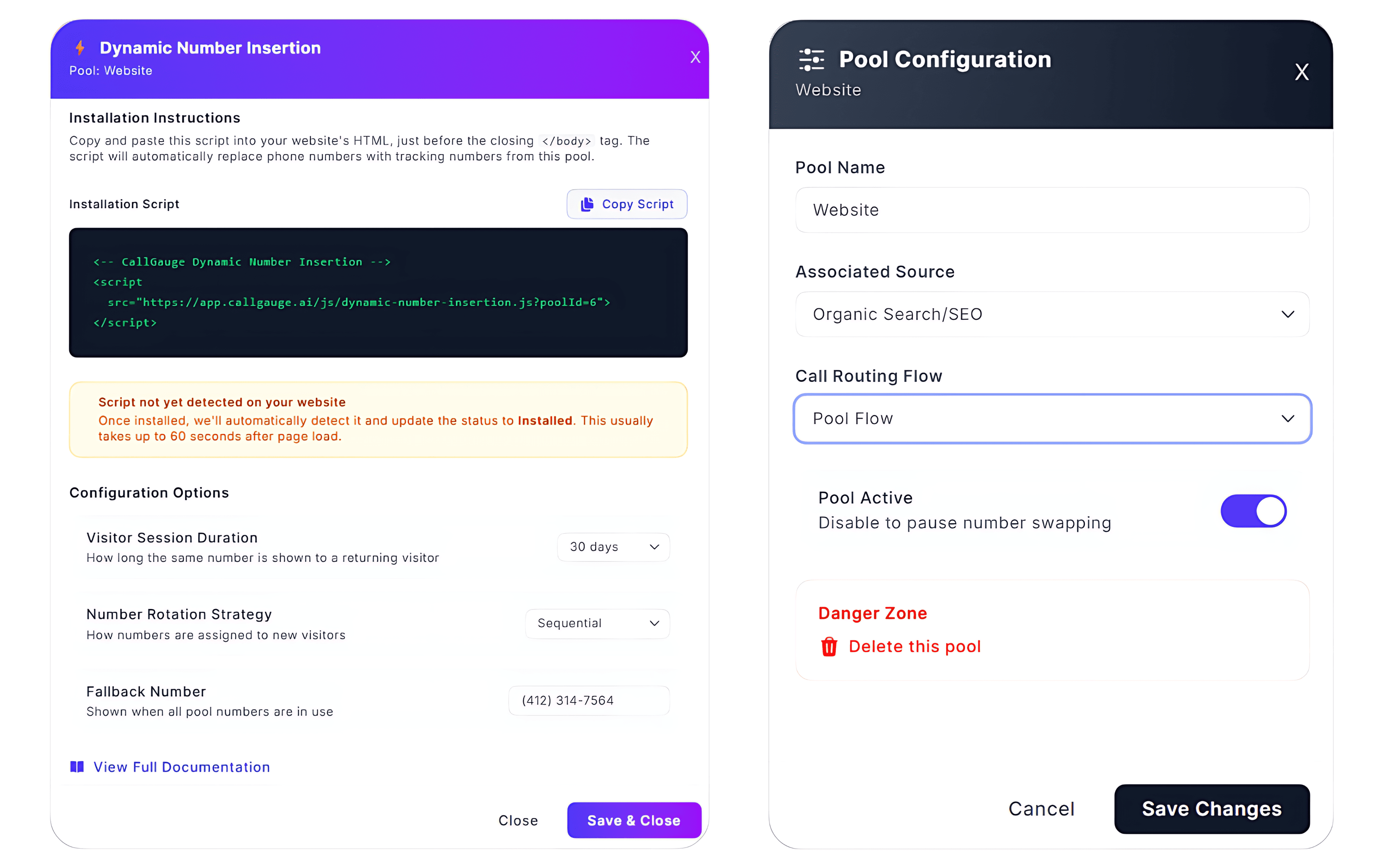
CallGauge AI lets you create and launch your Dynamic Number Insertion setup through a guided workflow covering number pools, attribution, routing, tracking activation and DNI script configuration. Configure how tracking numbers are assigned, how visitor sessions are handled and how attribution rules are applied across your setup.
Step Based Setup
Configure your number pools, assign tracking numbers and define call attribution and routing rules in a structured workflow effortlessly.
Session And Cookie Management
Control session duration and visitor persistence to maintain consistent call tracking.
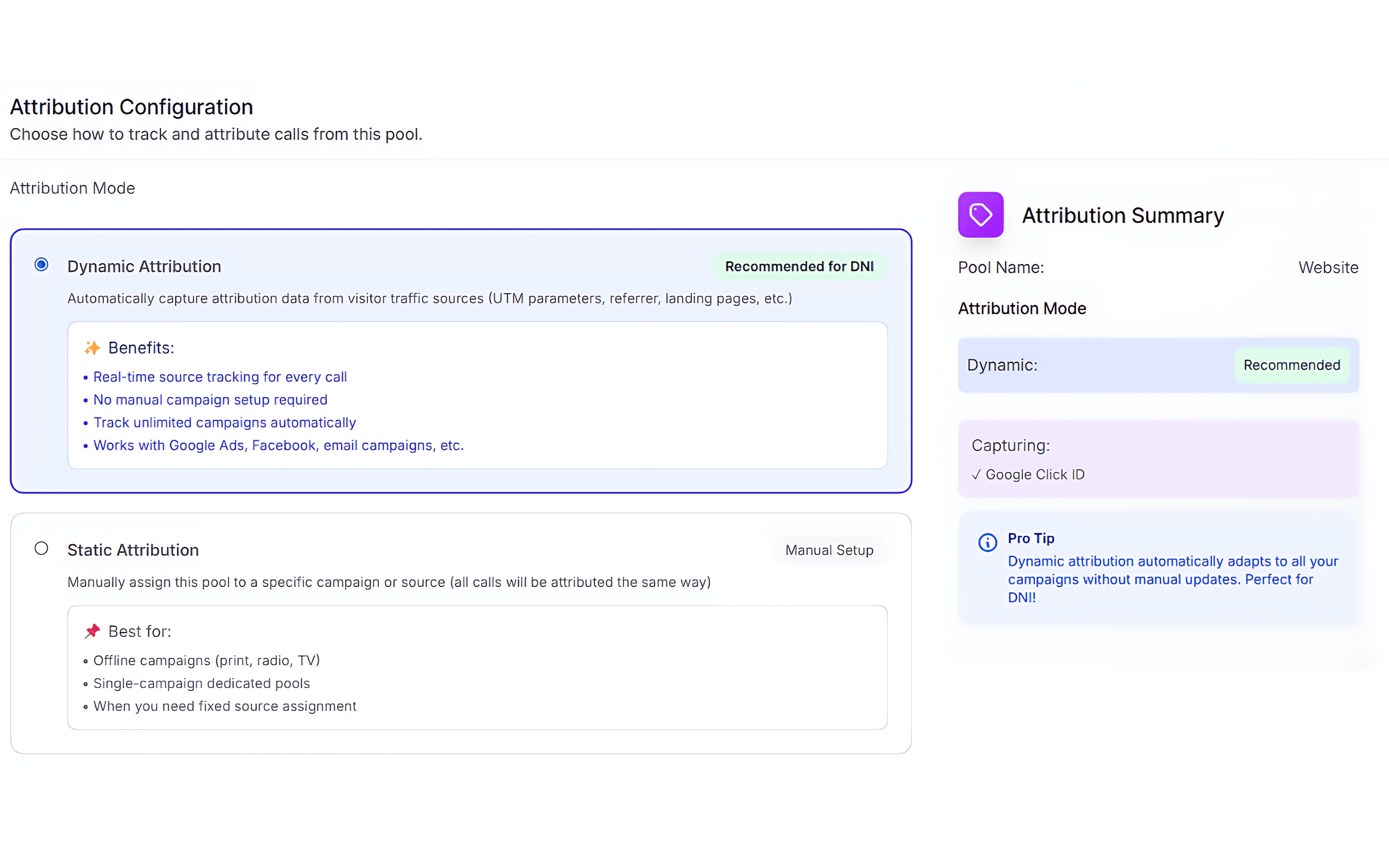
Attribution Configuration
Choose how your inbound calls are mapped by using dynamic or static attribution logic.
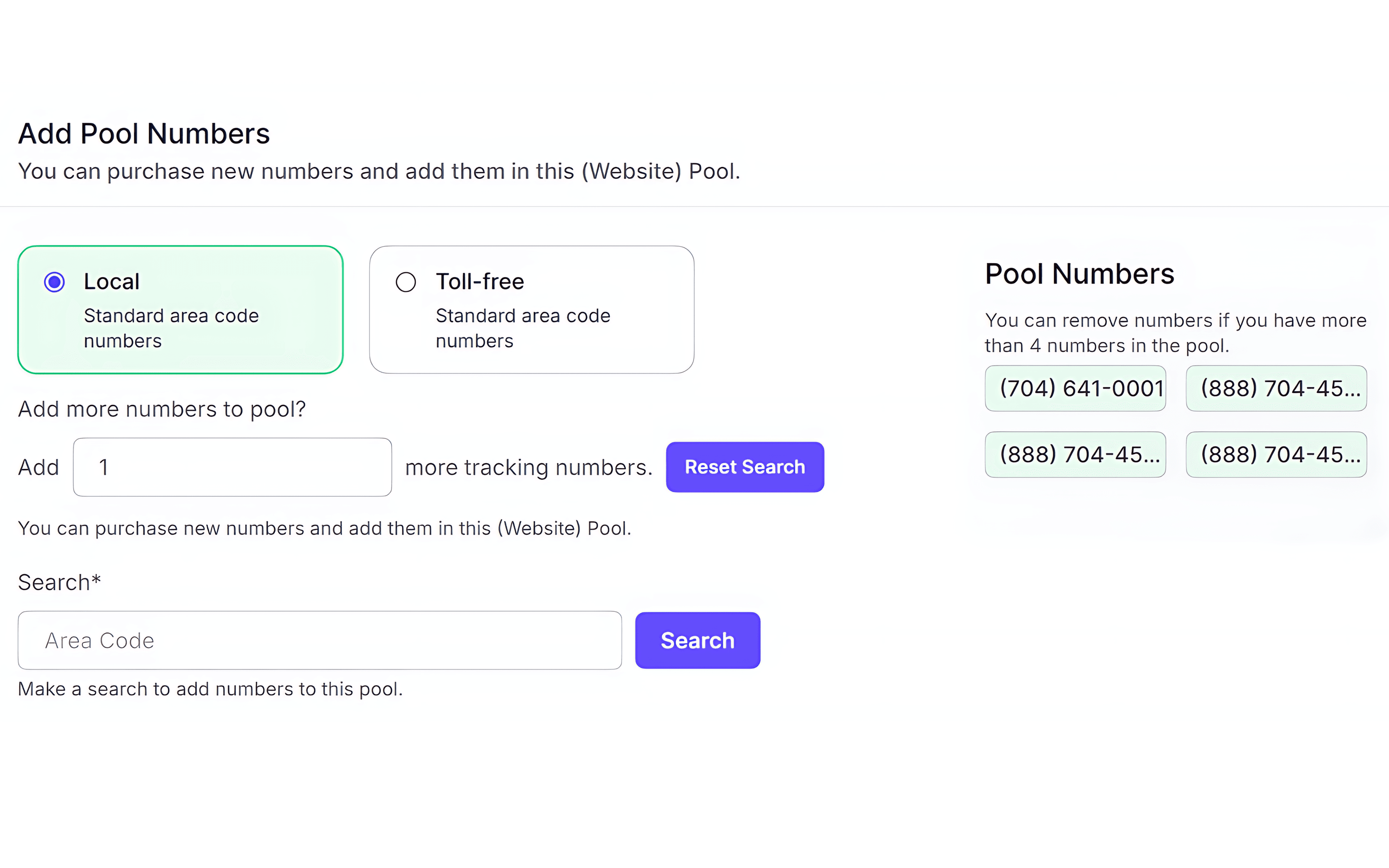
Scalable Number Pools
Adjust your number pool sizes according to traffic volume to maintain accurate number assignment and call tracking continuity.
Activity Monitoring
See Dynamic Number Insertion in Action
Monitor how your Dynamic Number Insertion setup performs as visitors interact with your website. Track your inbound call activity, validate your attribution flows and ensure your tracking numbers are assigned correctly across your campaigns.
Advanced DNI Configuration
Flexible Controls for Reliable Number Management
Number Pool Management
Create and manage your call tracking number pools easily on the basis of campaign demand and traffic volume.
Session Expiry Rules
Define when a visitor session ends and when a new swapping number should be reassigned to a new user.
Visitor Recognition Method
Identify and track your returning visitors using session and cookie based logic.
Traffic Based Allocation
Distribute your call tracking numbers dynamically based on incoming visitor volume.
Fallback Number Rules
Ensure that a default number is always displayed when no tracking numbers are available.
Multi Campaign Isolation
Separate number assignment across your campaigns to maintain clean call tracking environments.
Session Reuse Handling
Control how your returning visitors are matched with their previously assigned numbers.
Number Availability Monitoring
Track your pool usage in real time to avoid tracking number shortages during peak traffic times.
Real-Time Attribution Sync
Instantly link every inbound call to the active visitor session for 100% accurate data mapping.
Dynamic Number Insertion Insights for Every Team
Dynamic Number Insertion connects visitor sessions with inbound phone calls, helping teams understand their campaign performance, attribution accuracy and call activity across the organization.
Marketing Teams
Attribute their inbound calls to landing pages, keywords and traffic sources to improve their campaign performance and marketing ROI.
Data Analysts
Analyze visitor sessions, number pool usage and attribution patterns to improve their call tracking accuracy and reporting consistency.
Agency Partners
Show their clients exactly which campaigns and traffic sources generate their inbound phone calls and conversions.
IT & Web Ops
Monitor script status, call tracking activity and number assignment health across your website.
Activate DNI. Track Every Call With Precision.
Set up Dynamic Number Insertion, control how numbers are assigned across sessions and ensure every inbound call is connected to the correct visitor journey.
No credit card required. Setup in minutes.
FAQs – Dynamic Number Insertion
Can I track calls from different traffic sources using DNI?
Yes, Dynamic Number Insertion assigns unique tracking numbers on the basis of your visitor source, therefore allowing you to understand which campaigns and channels are driving your inbound calls.
Can I control how long a number stays assigned to a visitor?
Yes, you can configure session duration and expiry rules to control how long a tracking number remains assigned to a visitor before re-assignment.
What happens if all tracking numbers are in use?
If your number pool is fully utilized, a fallback number is usually displayed to ensure that no inbound calls are missed while maintaining call tracking continuity wherever possible.
How does number assignment work for each visitor?
Each visitor is assigned a unique call tracking number on the basis of session logic. The same number is maintained throughout the visitor session to ensure consistent tracking.
Does DNI work across multiple pages and sessions?
Yes, call tracking persists across page navigation within the same session, ensuring consistent number display and accurate session level tracking.
Do I need technical setup to enable DNI?
No, DNI can be enabled simply by adding only a tracking script to your website. Once installed, number assignment and call tracking will operate automatically by using your configuration.